Installation
Hardware
WiFi Module - ESP8285
Flashing Circuit for ESP8285
For flashing firmware into ESP8285, FTDI(USB -> Serial) chip is preferred but you can also use arduino uno or mega as a programmer. Connections for FTDI with ESP8285 are as follows:
| FTDI | ESP8285 |
|---|---|
| VCC(3.3v) | EN, VCC |
| TX3 | RX |
| RX3 | TX |
| GND | GND, GPIO |
Basically, by grounding GPIO will take ESP8285 into the boot mode in which you can flash programs and it’s applicable for all ESP modules.
Connection to FC
WiFi module will communicate to drone on one of serial port(UART3). Hence we need to solder RX, TX, VCC(3.3V) and GND. Corresponding port will be enabled in the cleanflight configurator.
| FC | ESP8285 |
|---|---|
| VCC(3.3v) | EN, VCC |
| TX3 | RX |
| RX3 | TX |
| GND | GND |
Barometer - BMP280 and Magnetometer - QMC5883L
BMP280 and QMC5883L will be communicating to FC over a I2C bus(I2C2) whoes pins are mapped over UART1(PA9: SCL ; PA10: SDA). The corresponding changes would be made in firmware. The connections are as follows:
| FC | BMP280 | QMC5883L |
|---|---|---|
| VCC(3.3v) | VCC | VCC |
| SCL2(TX1)(PA9) | SCL | SCL |
| SDA2(RX1)(PA10) | SDA | SDA |
| GND | GND | GND |
Software
Flashing Cleanflight Firmware
Cleanflight firmware is easy to get started with if you don’t want to write control algorithms and HAL drivers for the board all by urself. To flash Cleanflight firmware, you need to install Cleanflight configurator chrome extention.
Make sure you have STM32 Virtual COM Port Drivers installed. These drivers will help you to detect and flashing the programs into controller.
Note: Debian or linux users have execute below given commands additionally for flashing the firmware
$ sudo systemctl stop ModemManager.service
$ echo 'SUBSYSTEM=="usb", ATTRS{idVendor}=="0483", ATTRS{idProduct}=="df11", MODE="0664", GROUP="plugdev"' | sudo tee /etc/udev/rules.d/45-stdfu-permissions.rules > /dev/null
Once you are done, you can connect FC via USB and open the cleanflight configurator and follow the below mentioned steps
- Choose Board as SPRACINGF3EVO
- Choose Firmware version for SPRACINGF3EVO as CLFL_v2.2.0
- Enable Full chip erase
- Click on Load Firmware(Online)
- Click on Flash Firmware after it gets loaded
This project is very specific about the version because other version might or might not have some functionalities also some addition support will be added in this firmware version in later phase. Other versions might not support MSP, altitude hold etc

Once you are done with flashing the firmware into the FC you can set modes and toggle few settings to enable MSP over one of the serial ports(UART).
Installing MultiWii Python Library
To install MultiWii python Library follow the below given steps:
$ git clone https://github.com/krish-iyer/hackdrones
$ cd hackdrones/src/GCS/
$ pip3 install .
Flashing firmware to ESP8285 using Arduino IDE
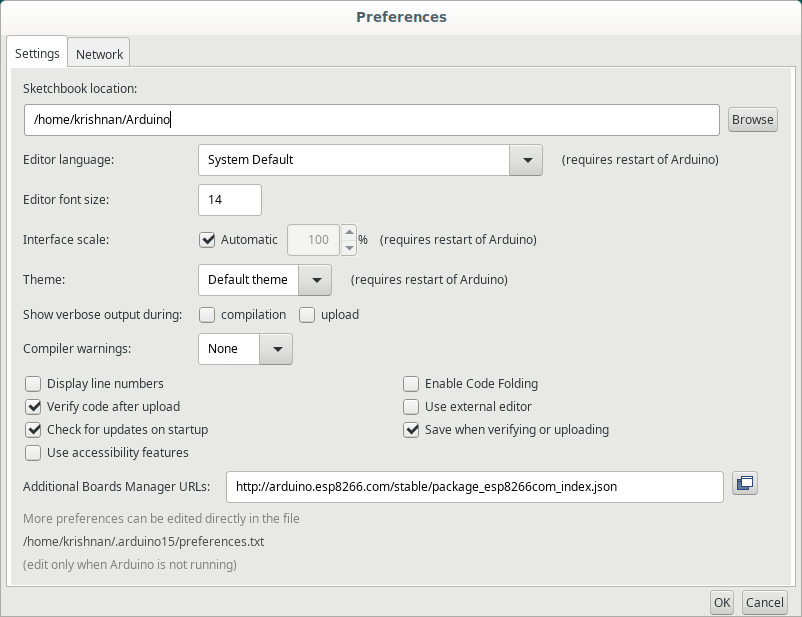
Before proceeding you need to add board support package for ESP8285 as follows
- Add http://arduino.esp8266.com/stable/package_esp8266com_index.json in File > Prefersences
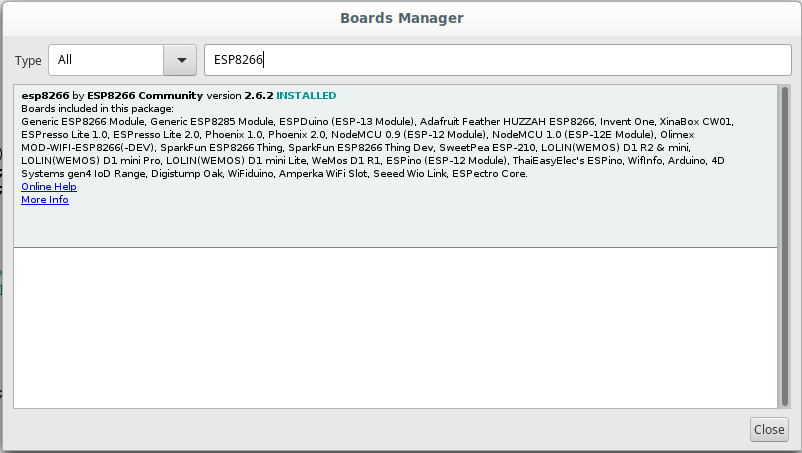
- Now go to Tools > Board > Board Manager
- Install ESP8266 package
- After connecting FDTI module with ESP8285, select board as Generic ESP8285 Module
- Select port For eg: /tty/USB0
- then click on Upload program